How to Set Up UPI Payment Gateway for Recurring Subscriptions: A Step-by-Step Guide for Indian Businesses

Key Takeaways
Setting up UPI AutoPay for recurring subscriptions can transform your Indian business's revenue stream, with mandates growing 10x in under two years to reach 1.27 billion transactions.
- Choose the right integration flow: Intent for mobile apps, Collect for desktop platforms, and QR codes for offline businesses to maximize customer conversion rates.
- Implement smart retry logic: Handle the 8-15% UPI AutoPay failure rate with strategic retry windows at 24, 72, and 168 hours to recover 15-20% of failed payments.
- Send pre-debit notifications 24-48 hours early: This compliance requirement also prevents insufficient fund failures by giving customers time to top up their accounts.
- Monitor three critical metrics weekly: 30% registration drop-off, 20% debit failures, and 18% mandate cancellations to identify and fix revenue leaks quickly.
- Test thoroughly in a sandbox environment: Validate the complete lifecycle from mandate creation to cancellation using test VPAs before going live with real transactions.
With proper implementation and optimization, UPI AutoPay delivers predictable cash flow while reducing manual payment follow-ups, making it essential for subscription-based businesses targeting India's massive digital payments market. Setting up a UPI Payment Gateway for recurring subscriptions has become essential for Indian businesses. UPI AutoPay mandates crossed 1.27 billion in November 2025 and grew 10x in under two years. The explosive growth taps into a subscription economy projected to reach $350 billion.
The numbers tell a compelling story. India processes 640 million UPI transactions daily and accounts for 50% of the world's digital transaction volume. Businesses face a $374.24 billion chance by 2033.
We'll walk you through the process of integrating a upi payment gateway for recurring payments in this piece, from choosing your provider to going live with UPI AutoPay.
What is UPI AutoPay and Why Use It for Recurring Payments
Understanding UPI AutoPay for Subscriptions
UPI AutoPay is a recurring payment feature built on India's Unified Payments Interface that lets customers set up recurring e-mandates through their UPI apps. The system works through a simple mechanism: customers review billing details (amount, frequency, start date and end date) within their UPI app and approve with their PIN. All future deductions occur on schedule from that point forward.
NPCI introduced the feature in 2020 to address the growing need for subscription-based payments in India. A mandate refers to the pre-approved instruction that lets consumers automate recurring payments. Customers complete a one-time authentication using their UPI PIN to authorize automatic deductions on a scheduled basis. This eliminates the need to approve every individual transaction.
UPI AutoPay supports a wide range of use cases: utility bills (electricity, water and gas), OTT subscriptions, EMI repayments, insurance premiums, mutual fund SIPs, telecom bills and offline subscriptions like gym memberships. Registered banks recorded 6 million mandates for UPI AutoPay in December 2021, up by 32% from November 2021.
Key Benefits for Indian Businesses
Businesses get steady and predictable cash flow through automatic debits without manual follow-ups with UPI AutoPay. Once a mandate is in place, customers are less likely to miss payments. This reduces churn and improves lifetime value. The automation reduces burden on support, billing and finance teams, freeing up resources for core business functions.
Customers benefit from effortless convenience as recurring payments happen on schedule. They retain full control to modify, pause or cancel mandates anytime from their UPI app. Every transaction is preceded by a notification, and users can view mandate details or history anytime.
Transaction Limits and Compliance Requirements
The 2026 framework introduces a split-tier limit system. Transactions up to ₹15,000 can be processed without Additional Factor Authentication (AFA). Specific high-value categories including insurance premium payments, mutual fund SIP contributions and credit card bill payments permit transactions up to ₹1 lakh without AFA.
Merchants must follow mandatory compliance requirements. A 24-hour pre-debit notification must be sent before every scheduled debit. The notification should include the amount, date and mandate reference. Customers must be able to pause, revoke or modify their mandate at any time from their UPI app. The updated framework lets customers view and manage all their active mandates across different UPI apps linked to the same bank account.
Prerequisites for Setting Up UPI Payment Gateway
You need to address four foundational requirements before accepting recurring payments through UPI AutoPay.
Choose a Payment Gateway Provider
Your first decision involves selecting a payment aggregator that offers UPI AutoPay API support. Review providers based on mandate management capabilities, supported flows (Intent, Collect, QR), retry intelligence, dashboard analytics and compliance handling. The right aggregator manages NPCI integration and bank communication and allows you to focus on your product.
Keep in mind that all payment gateway providers in India must hold a current RBI Payment Aggregator license or operate under a clear banking partnership. The list of authorized payment aggregators is available publicly to verify.
Complete Business Registration and KYC
UPI merchant onboarding requires businesses to submit specific documents: PAN card, Aadhaar, bank account proof and business registration details. GST certificate is needed if applicable. Banks review these documents to confirm the merchant's identity and business type.
The Reserve Bank of India enforces strict Know Your Customer (KYC) and Know Your Business (KYB) guidelines to verify all entities dealing with financial transactions. Requirements differ based on business type. Sole proprietorships require the proprietor's personal PAN card and address proof (Aadhaar/Voter ID/Passport). Business registration proof such as GST Registration Certificate or MSME/Udyam Registration Certificate is also needed. Partnership firms need the firm's PAN card, registered partnership deed and commercial property documents. PAN plus Aadhaar of all authorized signatories must be provided. Private limited companies face the most stringent requirements. These include Certificate of Incorporation, Memorandum of Association, Articles of Association and company PAN card. Board resolution is also required.
Set Up Your Merchant Account
The provider creates your account within the payment gateway's system after documents are verified. They configure settlement priorities and assign transaction limits. Your business receives a merchant ID at this stage.
Understand API Integration Requirements
Payment gateway setup involves integrating the gateway with your website, app, or point-of-sale system using APIs or plug-and-play plugins.
Step-by-Step Process to Integrate UPI AutoPay
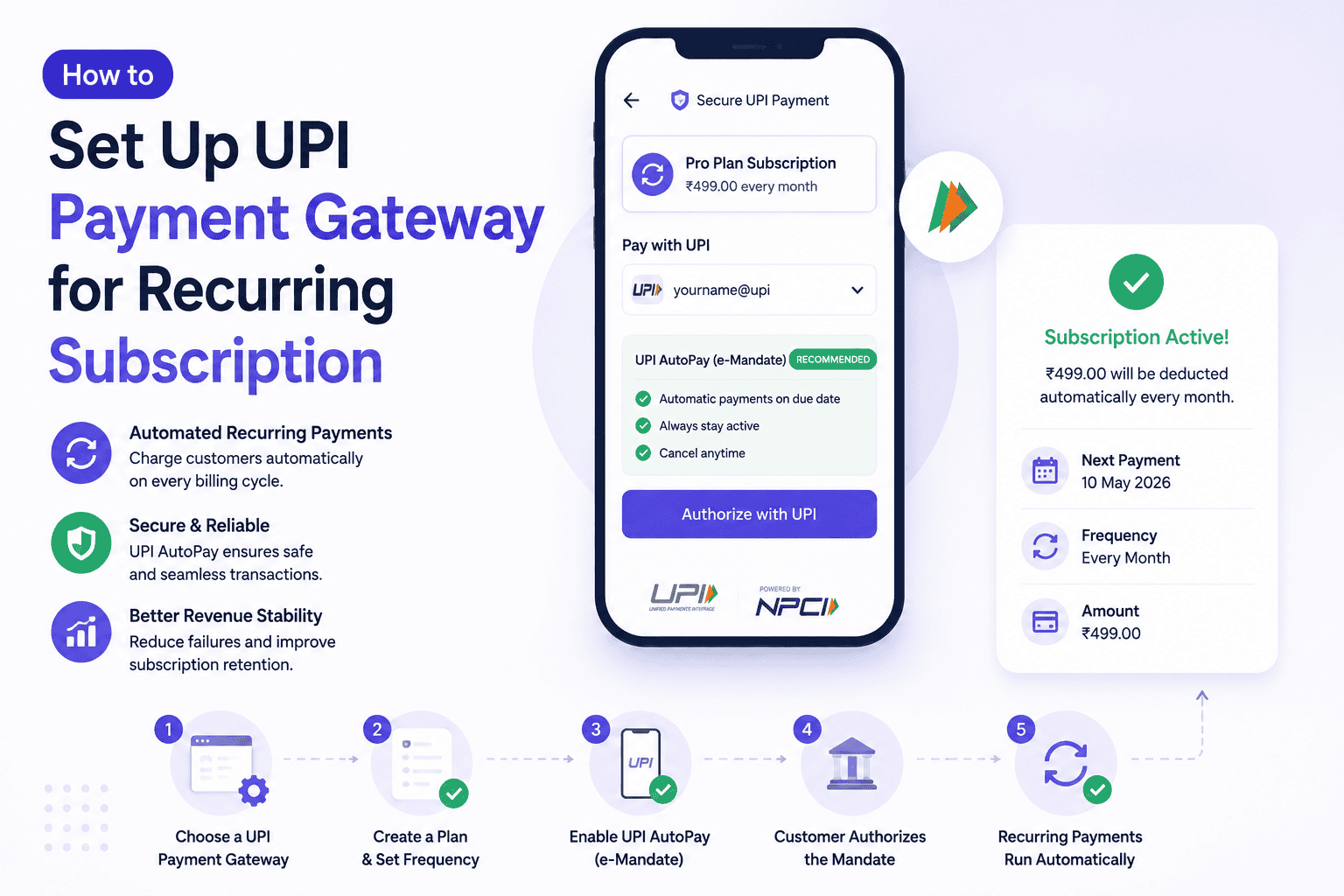
Step 1: Select Your Integration Flow (Intent, Collect, or QR)
UPI AutoPay integration offers three flow types. Intent flow launches the customer's UPI app on mobile devices with pre-filled transaction details. Collect flow sends a payment request to the customer's VPA, and they must approve via push notification or SMS. QR flow displays a dynamic QR code that customers scan with their UPI app. Mobile-first businesses should prioritize Intent, while desktop platforms work best with Collect and offline businesses benefit from UPI QR codes.
Step 2: Configure Mandate Parameters
You need to set the transaction limit within applicable tiers and define billing frequency (weekly, monthly, quarterly, yearly). Specify billing dates and choose between fixed or variable billing amounts. Variable billing requires a maximum cap that accommodates your highest expected charge.
Step 3: Implement API Integration
Registration requires customer account data, subscription details with plan codes and customer VPA. Your provider's create purchase endpoint receives these requests. The Mandate Execution API initiates recurring debits and needs order ID, amount, customer ID and mandate ID. Transactions must start at least 25 hours before the debit date to meet pre-debit notification requirements.
Step 4: Set Up Webhook Listeners
Your provider sends event notifications to configured webhook URLs. Mandate status updates (CREATED, ACTIVE, FAILURE) and transaction status changes (ORDER_SUCCEEDED, ORDER_FAILED) need monitoring. Idempotency logic handles duplicate events.
Step 5: Design Customer Authorization Flow
Customers review mandate details within their UPI app and authorize using their UPI PIN. Amounts under ₹15,000 require PIN entry only for the first payment. Amounts exceeding ₹15,000 require PIN authentication for each transaction.
Step 6: Test in Sandbox Environment
Your gateway provides test VPAs for validation. Success flows use credentials like testsuccess@gocash, and failure scenarios use testfailure@gocash. The complete lifecycle needs verification: mandate creation, authorization, pre-debit notification delivery, successful debit, failed debit and mandate cancellation.
Best Practices and Optimization Strategies
Once your UPI payment gateway goes live, optimization becomes the difference between steady revenue and avoidable churn.
Send Clear Pre-Payment Notifications
Send notifications 24 to 48 hours before each debit. This window gives customers time to top up their account balance and prevents insufficient fund failures. Include the exact amount, debit date and merchant name in every message.
Handle Failed Payments Gracefully
UPI AutoPay failure rates run between 8-15%, compared to 2-3% for card mandates. Implement smart retry windows at 24, 72 and 168 hours rather than rapid successive attempts. Offer a grace period of 2-3 days before you suspend service. This recovers 15-20% of failed users who see the notification and complete payment.
Provide Easy Mandate Management for Customers
Customers can pause, cancel or revoke mandates from their UPI app. Make this process visible in your subscription dashboard. Transparency converts one-time buyers into long-term subscribers.
Monitor Success Rates and Key Metrics
Track three critical leaks: 30% of subscribers drop off before they complete registration, 20% of subsequent debits fail, and 18% of active subscribers cancel mandates. Monitor these metrics each week.
Ensure Regulatory Compliance
RBI mandates pre-debit alerts at least 24 hours before each transaction. Provide post-transaction notifications and formal grievance redressal systems. Maintain audit-ready logs of all mandate activity.
Conclusion
You now have everything needed to integrate UPI AutoPay for your subscription business. The growth potential is massive. India processes 640 million daily UPI transactions.
Start by selecting your payment gateway provider and complete the KYC process. Implement the integration in your sandbox environment. Test it really well before going live.
Send clear pre-debit notifications and handle failed payments gracefully. Your subscription revenue will grow with time if you monitor your metrics weekly.
FAQs
Q1. Can I set up automatic recurring payments using UPI?
Yes, you can set up automatic recurring payments using UPI AutoPay. This feature allows customers to authorize recurring debits through their UPI app with a one-time PIN authentication. Once the mandate is approved, future payments are processed automatically according to the agreed schedule without requiring manual approval for each transaction.
Q2. Do payment gateway providers like Cashfree, Razorpay support UPI recurring payments?
Yes, major payment gateway providers in India support UPI AutoPay for recurring payments. These providers offer API integration that allows businesses to create subscription plans with custom pricing and billing schedules. The gateway automatically charges customers at regular intervals once they've authorized the mandate.
Q3. Are there any transaction fees for UPI recurring payments?
For individual users making personal UPI payments, there are no transaction charges regardless of the amount. However, businesses integrating UPI AutoPay through payment gateway providers may incur merchant fees depending on their agreement with the payment aggregator. The specific charges vary by provider and business type.
Q4. What is the difference between UPI and a UPI payment gateway?
UPI is the underlying real-time payment protocol developed by NPCI that enables instant interbank transfers. A UPI payment gateway is the technical infrastructure that connects a merchant's platform to the UPI network, handling API integration, mandate management, compliance, and communication with banks on behalf of the business.
Q5. What are the transaction limits for UPI AutoPay recurring payments?
UPI AutoPay has a split-tier limit system. Transactions up to ₹15,000 can be processed automatically without additional authentication for each payment. For specific categories like insurance premiums, mutual fund SIPs, and credit card bills, the limit extends to ₹1 lakh without requiring authentication for every transaction.

